Your Mac charges. Or does it?
A charger can break quietly: power comes and goes for days while the battery icon never says a word. Broken Charger sits in your menu bar, watches how reliably your Mac charges, and when something is wrong it finds the broken part with you, one small change at a time.
Broken Charger menu bar app for Mac macOS 12.0 or later, Apple Silicon and Intel No subscription, no ads No network code, nothing leaves your Mac
What does Broken Charger show?
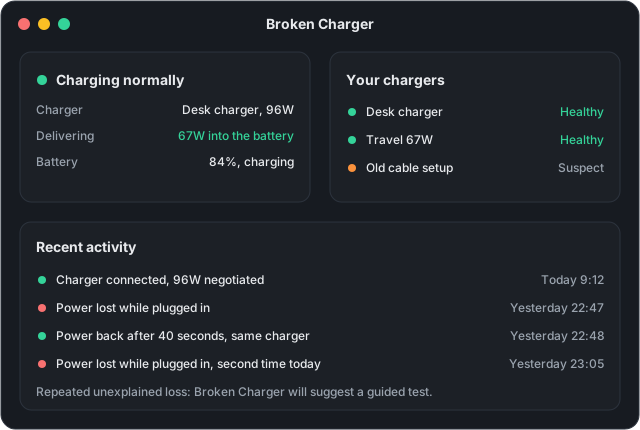
Broken Charger shows your Mac's charging as it really is, live, in plain words. Everything below updates in the menu bar within a second or two of plugging in or unplugging.
The watts you really get
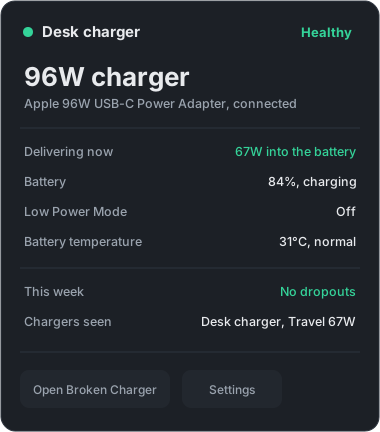
The connected charger and the power it actually delivers, live in the menu bar. A "96W" charger that negotiates 20W through a bad cable is caught on sight.
Every dropout, recorded
Power that comes and goes is the signature of a dying charger. Each loss and recovery lands in the activity list with a timestamp, in plain words.
A health word per charger
Broken Charger remembers each charger you use by name and gives it a simple verdict, so you know which one to grab and which one to retire.
Honest warnings only
Low Power Mode, hot-battery pauses, and too-weak chargers are explained, not alarmed about. A normal unplug is never called a fault.

How does it find the broken part?
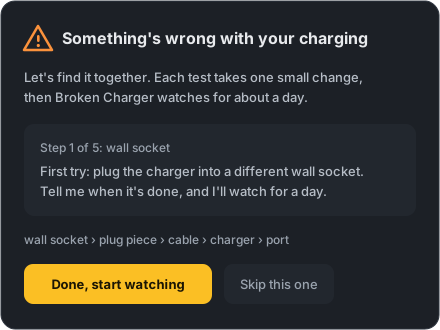
When charging fails repeatedly without explanation, Broken Charger proposes a guided test: a short ladder of one-change-at-a-time steps, watched for about a day each, until the guilty part is isolated. This is the same elimination method a repair technician uses, minus the repair bill.
- Wall socket. Plug the charger into a different socket. Broken Charger watches for about a day and compares the dropout rate against your baseline.
- Plug piece. Check the removable piece that goes into the wall sits firmly in the charger, then push it in tight.
- Cable. Try a different charging cable, if you have one.
- Charger. Try a different charger, if you have one.
- Port. One more: plug into a different port on your Mac.
After each change it tells you honestly whether the problem stopped or stayed. If a step is impossible for you, skip it; if the problem never returns, the test stands down instead of inventing a villain.
Why can it judge your charging on day one?
Your Mac already keeps a power diary: macOS logs charging events to the
/var/log/powermanagement folder on its own. With your one-time
permission, Broken Charger reads that folder (read-only, through the standard macOS
file picker) and assesses roughly the past two weeks of charging the moment you
install it. Skip the permission and it simply starts watching from that day onward.
Either way, nothing is written there and nothing leaves your Mac.
How is this different from battery health apps?
Battery health apps and Broken Charger answer different questions. If you want to know how worn your battery is, a battery health tool is the right choice. If your Mac won't charge, charges intermittently, or you suspect a charger or cable, that is Broken Charger's job.
| Question you have | Tool built for it | How it answers |
|---|---|---|
| Is my charging setup reliable? Which part is broken? | Broken Charger | Watches charging over time, records dropouts, runs a guided elimination test across socket, plug piece, cable, charger, and port |
| How worn is my battery? What is its real capacity? | coconutBattery, Battery Toolkit | Reads battery health, cycle count, and capacity at a point in time |
| Can I limit charging to 80% to slow battery aging? | AlDente | Controls the charge level the battery is held at |
| How many watts flow through this cable right now? | Hardware USB-C power meter | Inline meter between charger and Mac; Broken Charger reads the same negotiation in software, no hardware needed |
What does it never do?
- Subscription
- None.
- Accounts
- None. There is nothing to sign into.
- Ads
- None.
- Data collection
- None. The app contains no network code at all, so nothing can leave your Mac. The App Store privacy label is "Data Not Collected".
Frequently asked questions
Why is my MacBook not charging?
A MacBook that will not charge usually has a fault in one of five places: the wall socket, the removable plug piece on the charger, the cable, the charger itself, or the port on the Mac. Broken Charger finds the guilty part by changing one thing at a time and watching the result, instead of guessing.
How do I know if my Mac charger is broken?
A broken charger often fails intermittently: power comes and goes while the battery icon says nothing. Broken Charger watches your charging around the clock, records every dropout, and gives each charger you use a simple health word, so a failing charger is caught in days instead of weeks.
What does Broken Charger show in the menu bar?
While plugged in, it shows the wattage your charger really delivers, for example 96W, with a color for the state: green for good, blue for charging, orange for caution, red for a detected fault. On battery it shows the watts your Mac is drawing.
Does Broken Charger work on Apple Silicon and Intel Macs?
Yes. Broken Charger is a universal app for macOS 12.0 or later, and runs natively on both Apple Silicon (M1 and newer) and Intel Macs.
Does Broken Charger need an internet connection?
No. Broken Charger contains no network code at all. Nothing you do in the app leaves your Mac, there are no accounts, no analytics, and no tracking of any kind.
How can it judge my charging on the first day?
With your one-time permission, Broken Charger reads the power log your Mac already keeps (the /var/log/powermanagement folder), so it can assess roughly the past two weeks of charging on day one. If you skip that step, it simply starts watching from that day onward.
Is Broken Charger a battery health app like coconutBattery or AlDente?
No. Battery health apps answer "how worn is my battery?". Broken Charger answers a different question: "is my charging setup reliable, and if not, which part is broken?". It watches charging over time and runs a guided elimination test across socket, plug piece, cable, charger, and port.
Stop guessing which part is broken
Broken Charger is a menu bar app for Mac (macOS 12.0 or later, Apple Silicon and Intel) that watches how reliably your Mac charges, catches power that comes and goes, and walks you through finding the broken part: wall socket, plug piece, cable, or charger. No subscription, no accounts, no ads, and no data collection; the app contains no network code at all.
Download on the Mac App Store